
This guide will be most useful to people who already own some bitcoin.
Maybe you dollar-cost average on Kraken; maybe you bought once on Coinbase years ago. Either way, as long as you’re withdrawing to a wallet you control, I wouldn’t try to dissuade you from continuing to use centralised exchanges.
There is, however, a case for diversifying.
Thanks to KYC (“know your customer”) regulation, centralised exchanges know your name, address, bank details, and purchase history. Perhaps they even required you to upload scans of your passport and a selfie photo to register, meaning they also know what you look like. Every sat you buy on a centralised exchange is permanently linked to your identity.
This guide is about buying bitcoin that isn’t.
Contents
- Why bother with non-KYC bitcoin?
- Your options (and why this guide focuses on Bisq)
- Step by step: buying bitcoin on Bisq
- A few things worth knowing about Bisq
- The freedom to choose
Why bother with non-KYC bitcoin?
For me it’s both practical and ideological.
When you buy bitcoin on a regulated exchange, the data you hand over doesn’t stay in one place. It sits on a server somewhere and is occasionally leaked onto the internet. In the UK, exchanges now share your data directly with HMRC. This means it’s not enough to trust your chosen exchange. You also need to trust every third party and intermediary that they’re sharing your data with, including your government.
Consider any coins acquired via a centralised exchange as permanently tied to your real-world identity. If you later send, spend, or move those coins, chain analysis firms exist specifically to follow the trail - and their client list includes governments, law enforcement, and private companies.
None of this means you should stop using your preferred centralised exchange. I’m no purist; KYC exchanges are convenient and highly liquid. But there are good reasons to hold at least some non-KYC bitcoin.
We live in a world of 24/7 surveillance and continual erosion of privacy rights — biometrics at borders, AI-powered tracking, ever-expanding government oversight. In this context, the freedom offered by Bitcoin — to save in your preferred currency, to trade freely with peers, and to take full control of your money — feels like one of the few freedoms that’s genuinely yours to exercise.
Your options (and why this guide focuses on Bisq)
There are more no-KYC options than you might expect. Here’s a quick comparison of the main ones:
| Platform | Type | Model | Security deposit | Typical trade size |
|---|---|---|---|---|
| Bisq | Desktop P2P (Tor) | 2-of-2 multisig escrow | ~15% BTC | Up to 0.0625 BTC |
| Bisq Easy (Bisq 2) | Desktop P2P (Tor) | Seller reputation system | No | Up to ~$600 |
| RoboSats | Browser P2P (Tor) | Lightning hold invoices | ~3% Lightning bond | Up to 0.04 BTC |
| Peach Bitcoin | Mobile P2P | 2-of-2 multisig escrow | None | Up to ~CHF 1,000/day |
| Vexl | Mobile social P2P | In-person / trusted network | None | Any (peer-agreed) |
For a comprehensive, regularly updated comparison of no-KYC services, kycnot.me is excellent.
I’ve chosen Bisq 1 for this guide because it’s the most battle-tested option for buying meaningful amounts of bitcoin with a strong security model. It’s a decentralised peer-to-peer exchange that’s been running since 2016, uses multisig escrow (so funds are locked until both parties are happy), and supports fiat payment methods like Faster Payments and SEPA directly. The trade-off is that it’s a desktop application and requires a small bitcoin security deposit.
Step by step: buying bitcoin on Bisq
1. Download and install
Head to bisq.network/downloads and select the installer for your OS. Bisq runs on Windows, macOS, and Linux.
When you first open it, it’ll take a minute or two to connect. Bisq routes all traffic through Tor automatically (you don’t need to configure anything), and it syncs with the peer-to-peer trading network on startup. There’s no account to create or email to verify - it’s effectively anonymous at this point.
2. Secure your wallet
The Bisq application will create a wallet for you, to hold your security deposit and receive any bitcoin you buy. You can and should withdraw periodically to cold storage, as you would using a centralised exchange.
You need to set a wallet password and write down your seed words. Go to Account / Wallet Seed and write down the seed words on paper. Store them somewhere safe. Then go to Account / Wallet Password and set a strong password for the Bisq application.

This wallet - and all your Bisq data - lives on your computer. There’s no “forgot password” button, no account to recover or support team to help you. If your computer dies and you haven’t backed up, it’s gone.
For this reason, you should take regular backups - and make your first while you’re here. Head to Account / Backup and export a copy of the Bisq data directory. It contains your wallet, your payment accounts, and your trade history.
3. Add a payment account
To buy bitcoin using fiat currency (i.e. GBP / USD / EUR), you need to add your bank account details to Bisq. These will be stored locally on your machine; they’re never sent to any remote server, and Bisq does not handle fiat currencies at all.
Why, then, does Bisq need bank account details? Two reasons.
- So your trading partner knows who to expect the money to come from (or, if you’re selling bitcoin, so that you know who to pay!)
- To measure account age - while Bisq 1 doesn’t have a reputation system, you can see how long a counterparty’s account has been active before accepting a trade.
Go to Account / National Currency Accounts and click Add New Account.
Select your payment method from the dropdown. In the UK, Faster Payments is the obvious choice - this is the system which powers modern bank transfers. It’s near-instantaneous and there’s decent liquidity on Bisq. In Europe, SEPA is the standard option, though trades take longer due to bank transfer times.
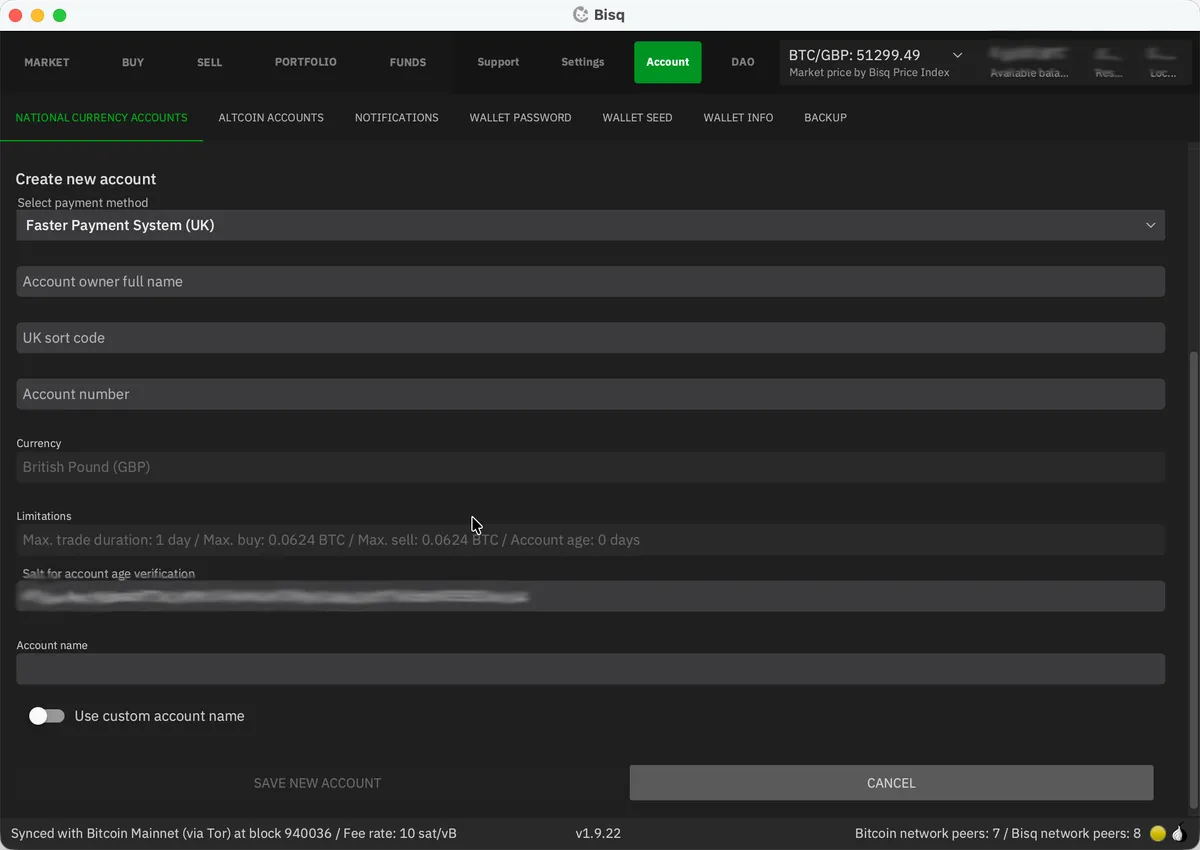
Enter the details exactly as they appear on your bank account. This is important - your seller will need to match the payment they receive to the details you enter here. If you make a mistake, you can’t edit it after saving; you’ll have to delete and re-add the account (resetting its age to zero).
4. Fund your Bisq wallet (the catch 22)
Bisq requires both buyer and seller to post a security deposit in bitcoin for every trade. For buyers, this is typically 15% of the trade amount, with a minimum of 0.001 BTC. Add mining fees and trading fees on top, and you’ll realistically need around 0.002 BTC (about £100, as of early 2026) to get started.
So yes - you need bitcoin to buy bitcoin. The most practical ways to get your initial deposit:
- Friends & family. Ask someone you trust if they’ll sell you a small amount of bitcoin to get you started. This is probably the best option, especially if you know other bitcoiners - most will be more than happy to help get you started.
- Use Bisq Easy. Download Bisq 2 (it runs alongside Bisq 1 without conflict), buy a small amount through Bisq Easy’s reputation-based protocol, and transfer it to your Bisq 1 wallet. This keeps everything non-KYC from the start.
- Find a Bitcoin ATM. Many ATMs don’t require ID for small transactions. coinatmradar.com will show you what’s nearby. Expect a premium - ATM operators typically charge 5-10% above spot.
- Buy it using a KYC exchange. I’d advise strongly against this. While KYC exchanges have their place, mixing your KYC and non-KYC coins is a big no-no - it creates a permanent link between your identity and your anonymous coins which cannot be undone.
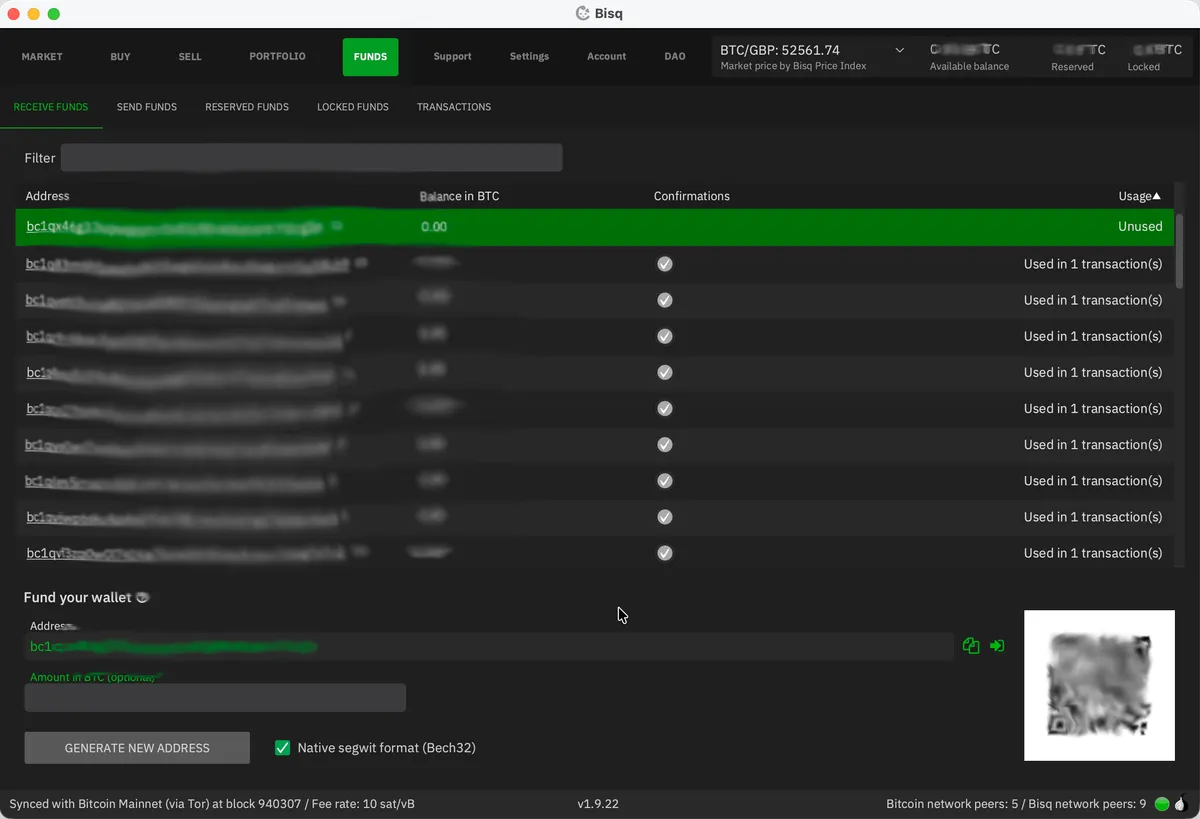
More ideas can be found on Bisq’s wiki. Once you have enough BTC, go to Funds / Receive Funds in Bisq and send your bitcoin to one of the listed addresses. Wait for it to confirm on-chain - one confirmation is enough, so roughly 10 minutes.
5. Find and take an offer
Time for some actual trading. Let’s look at the Market / Offer Book tab:
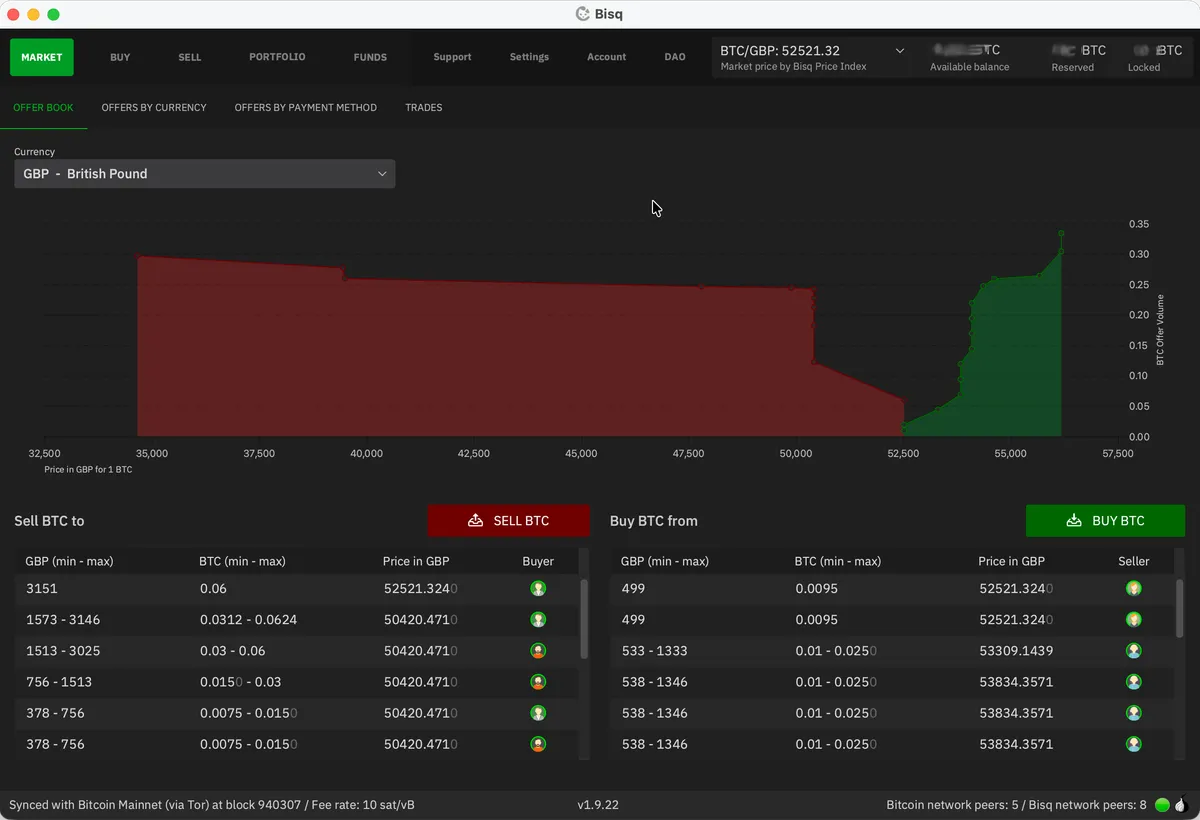
This shows the current buy and sell offers in your chosen currency, along with the price spread between them. It’s normal to pay a “non-KYC premium”, and 1-2% above spot is typical. But if you’re patient, you can often find someone selling at or near spot price. The screenshots above and below - taken while writing this guide - show just such an occasion. Occasionally I’m able to nab an offer from someone selling below spot (e.g. -0.5%).
As a buyer, you can choose to accept an offer from a seller (i.e. be a taker) or to list an offer to be shown to potential sellers on the Sell BTC tab (i.e. be a maker). The combined BTC trading fee on Bisq is 1.3%, with more than 1% being borne by the taker (person accepting an offer). This asymmetry - common to all exchanges - is designed to encourage market makers to be competitive and add liquidity.
For your first buy I’d encourage you to take an offer. It avoids waiting around for a seller to accept your offer and makes for a simpler first experience with Bisq. Head to the Buy / Bitcoin tab, making sure you’ve filtered to your chosen currency and payment method.
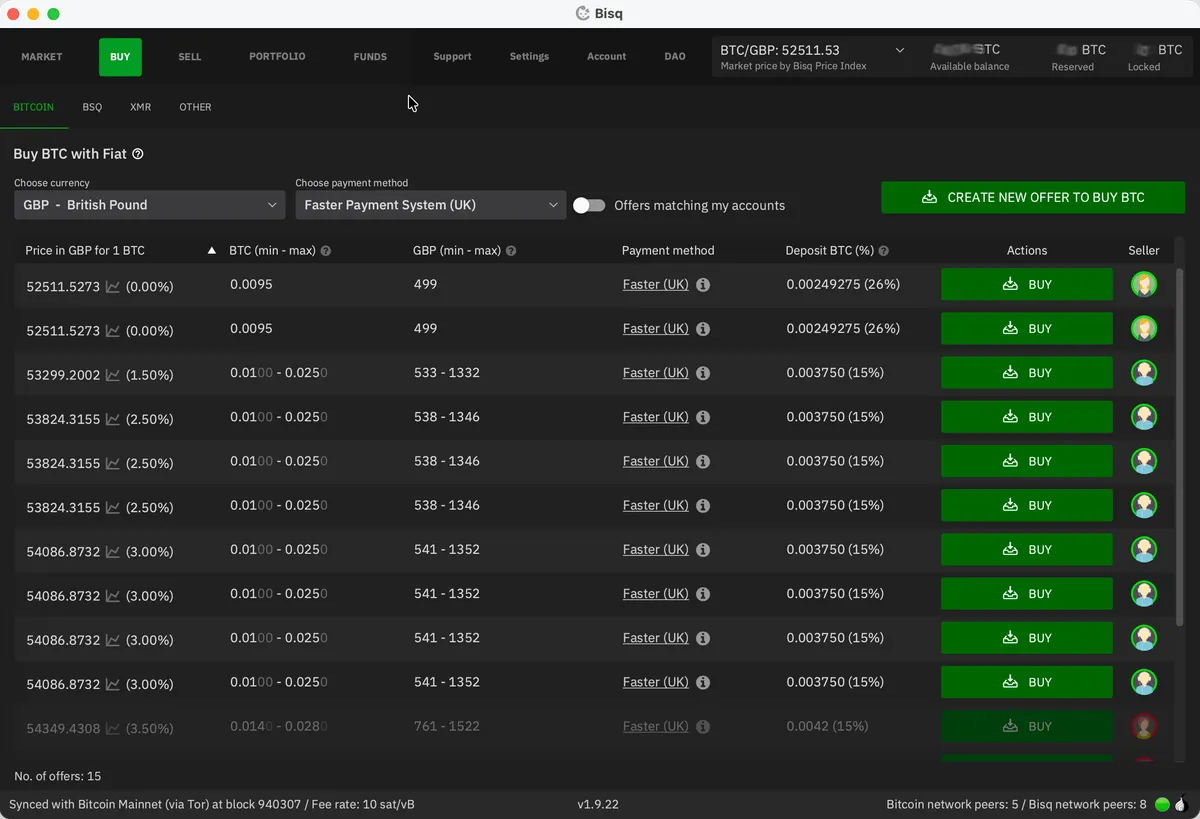
Each offer shows:
- The price (expressed as a percentage above or below the current spot price)
- The amount range (min and max BTC the person is willing to sell)
- The required security deposit percentage (normally 15%)
Find an offer that works for you and click Buy. If the offer is for a range, this is where you’ll decide how much bitcoin you want to buy - all other fields are locked. Review the fee information at the bottom, then hit Next step.
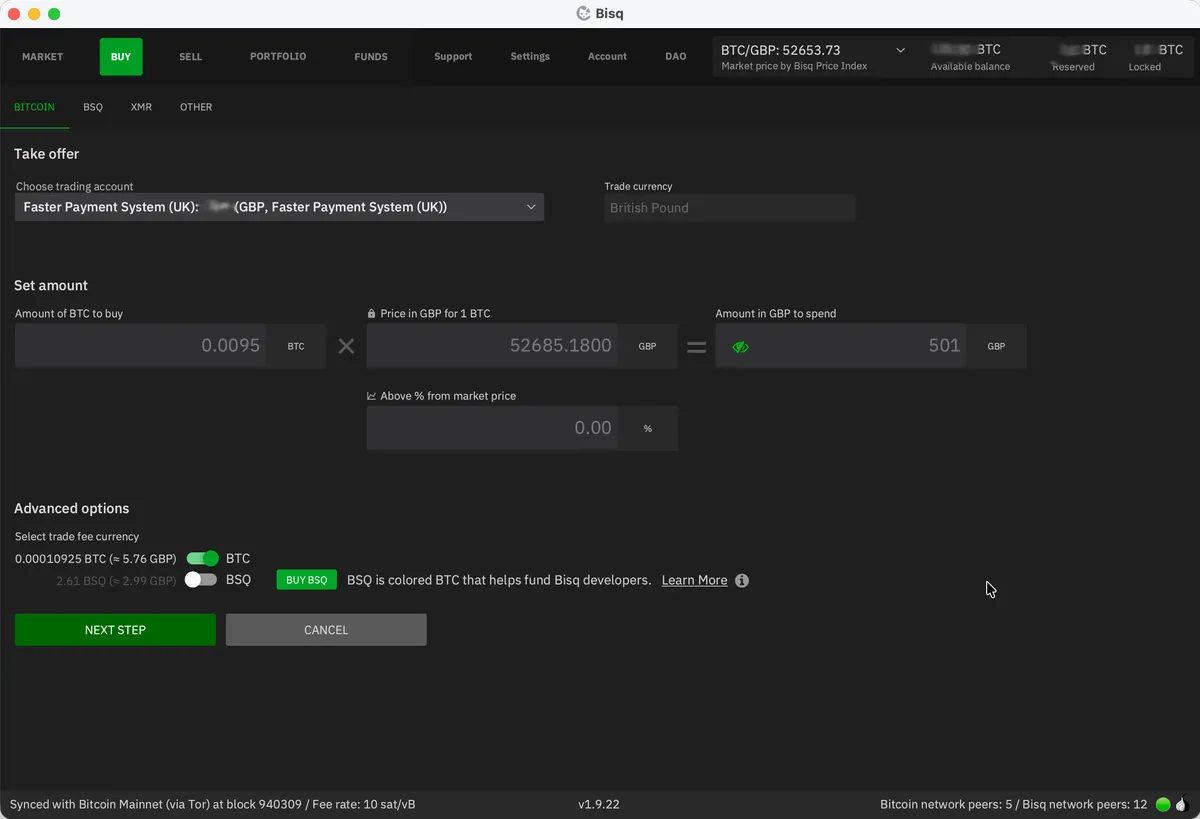
If your Bisq wallet is already sufficiently funded to cover the security deposit, you’ll jump straight to the summary screen. If not, you’ll be prompted to deposit the necessary funds before continuing.
The summary screen confirms the exact amount of BTC you’ll receive, the fiat amount you’ll need to pay, the security deposit required, and the fees. Look at this carefully. Once you hit Confirm: take offer to buy bitcoin, you’re committed and your security deposit will be locked in escrow.
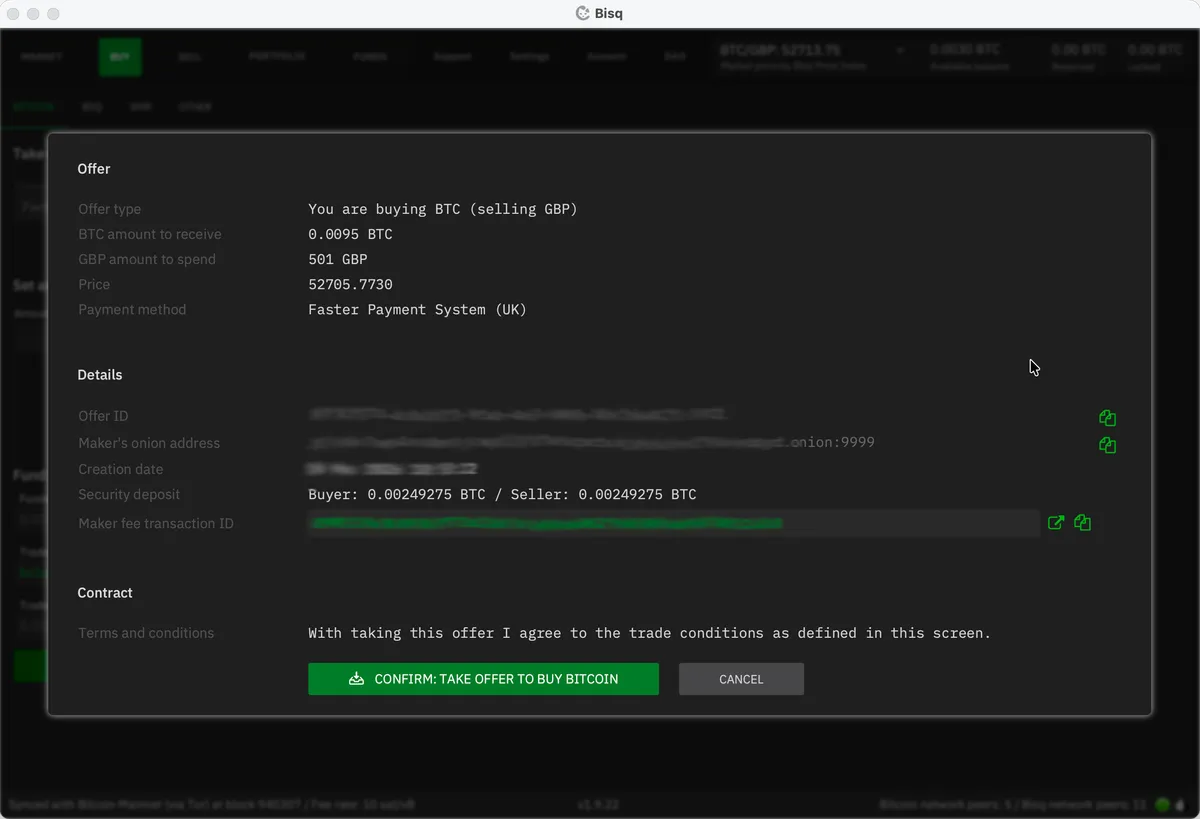
Time to buy some bitcoin!
6. Send your fiat payment
Once the trade is confirmed and the deposit escrow transaction has at least one blockchain confirmation (~10 minutes), Bisq will show you the seller’s bank details in the “Start payment” step.
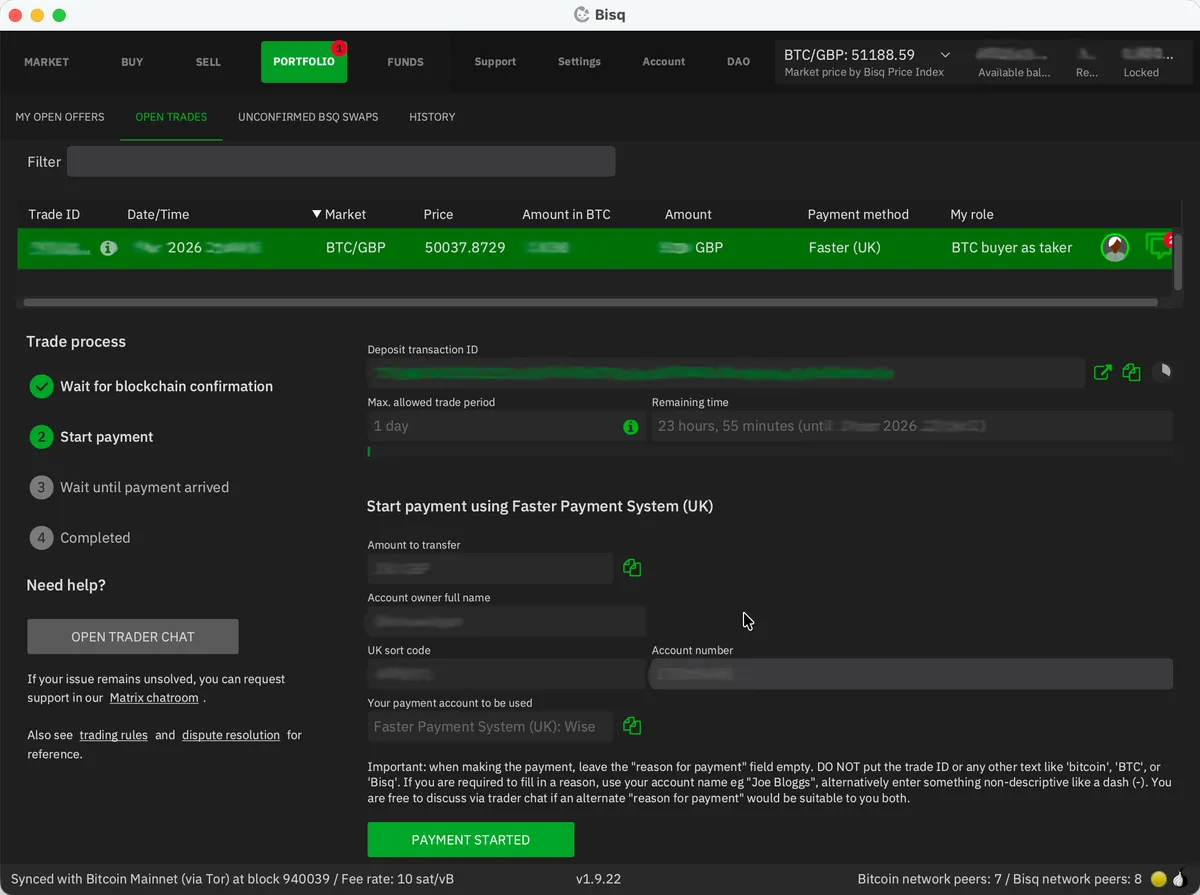
Send the agreed amount via your chosen payment method, from the same bank account you registered in Bisq. Do not put anything related to Bitcoin or Bisq as the payment reference - if your banking service requires some text here, use the seller’s name or agree on a suitable alternative with them using the chat box.
A crucial detail: Bisq has no integration with your bank. It can’t see whether you’ve paid. After sending payment, you must click the Payment Started button in Bisq to notify the seller. Forget this step and your trade will stall.
For bank transfers via Faster Payments, the actual transfer should take only seconds. For SEPA, it could take a day or two. There’s a countdown timer - the seller needs to receive your payment before it expires, so act quickly.
7. Wait for completion
The seller will check their bank account, confirm they’ve received your payment, and click Payment Received on their end. Once this is complete, Bisq releases the bitcoin from the multisig escrow.
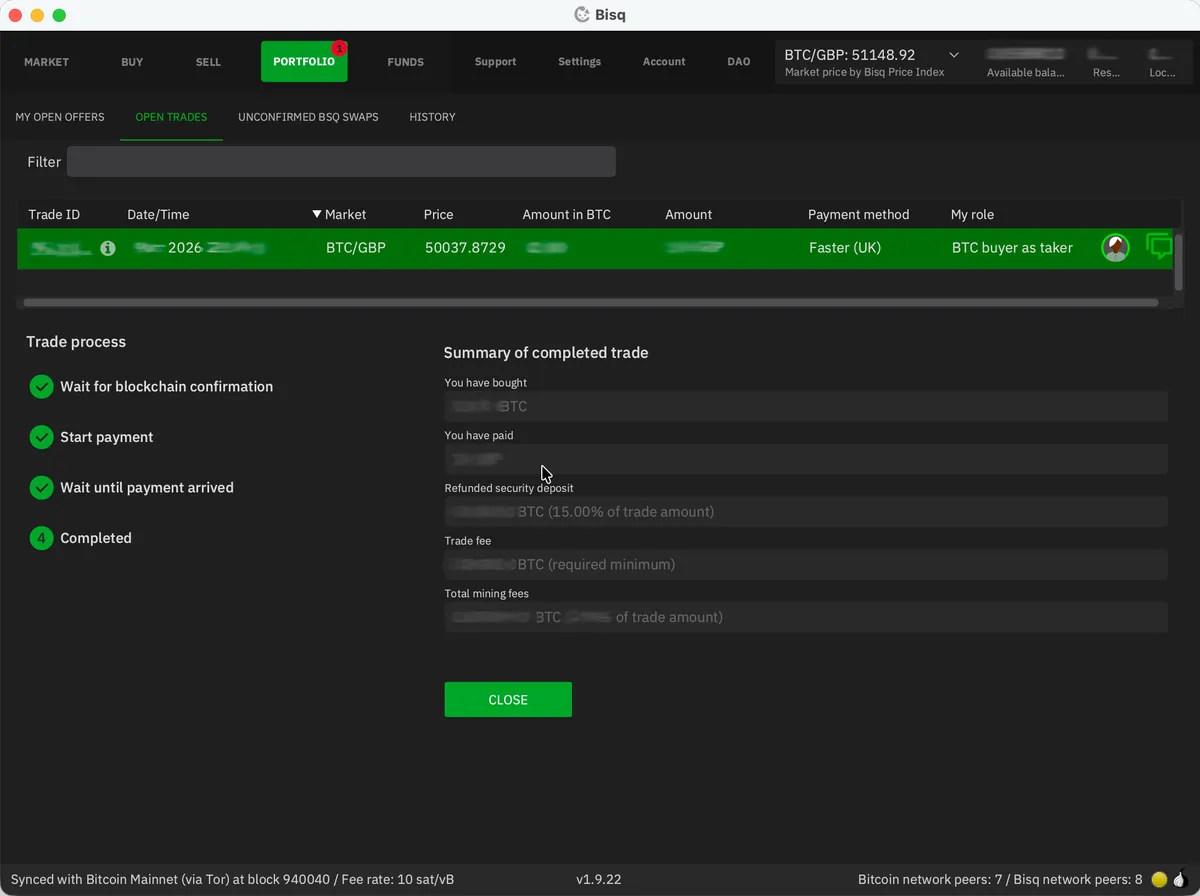
The bitcoin you’ve bought will be added to your Bisq wallet along with your refunded security deposit. Much like with any exchange, I’d recommend periodically withdrawing to your own hardware wallet. Be sure to keep this entirely separate from wherever you store your KYC bitcoin; mixing the two defeats the purpose. I’d recommend creating a separate account within your hardware wallet for your “clean” bitcoin.
And that’s it. You’ve just bought bitcoin without handing over a single piece of identification.
A few things worth knowing about Bisq
- Your Bisq application must be running for your offers to be visible. If you create an offer (rather than taking someone else’s), it disappears from the network the moment you close Bisq. This is fundamentally different from a centralised exchange. Plan accordingly.
- Disputes happen, but rarely. Bisq has a three-tier resolution system: first you and your trading partner try to resolve it via encrypted chat, then a mediator steps in, and finally an arbitrator can make a binding decision backed by the DAO. In years of trading, I’ve never needed to use it, but it’s reassuring that it exists.
- Spread out your buys. Banks have been known to flag users who send money to lots of new recipients in a short space of time. A nice reminder that the money in a bank account is not really yours. I’d suggest spreading out your buys, doing a few larger trades rather than lots of little ones, and using multiple accounts (e.g. your regular bank account, plus a Wise or Revolut account, and so on).
- Your tax obligations remain the same. You’re still responsible on that front, and it’s beyond the scope of this guide.
The freedom to choose
Much of the language around financial privacy has been deliberately poisoned. The framing is always the same: if you want privacy, you must have something to hide. Much like how protests against the Online Safety Act result in insincere accusations of sympathising with criminals or predators, using anonymous exchanges might lead some to ask “why, are you a money launderer?”
No. I exercise my right to buy and sell with my own money without government oversight. That’s it.
Bitcoin offers something genuinely unusual: a way to save money that doesn’t require anyone’s permission. No bank can freeze it. No exchange can lock your account because an algorithm flagged a transaction. No data breach can expose your entire financial history. But only if you actually use it that way. Bitcoin bought on a KYC exchange, left on that exchange, and sold on that exchange is just a bank account with extra steps.
Buying non-KYC bitcoin lets you exercise a choice - quietly, deliberately - while that choice still exists.
The tools are here. They’re free. They work.
Support the site
Thanks for reading. If you found this guide valuable, you can support my work by sending me (conveniently non-KYC!) bitcoin:
Scan with Tap to open your Bitcoin wallet, or copy the on-chain address below.
Scan with Tap to open your Lightning wallet, or copy my Lightning address below.
You can also subscribe to be notified when I publish new articles: